
See what your AI agent did in your project
X-Filer is a window into a project you run with Claude Code. It shows what changed since you last looked and who changed it, and lets you put things back — in plain words, without git, a terminal or an IDE.
Version 0.4.0-beta.3 · Free for local files · No account needed · Updates itself
Other versions and system requirements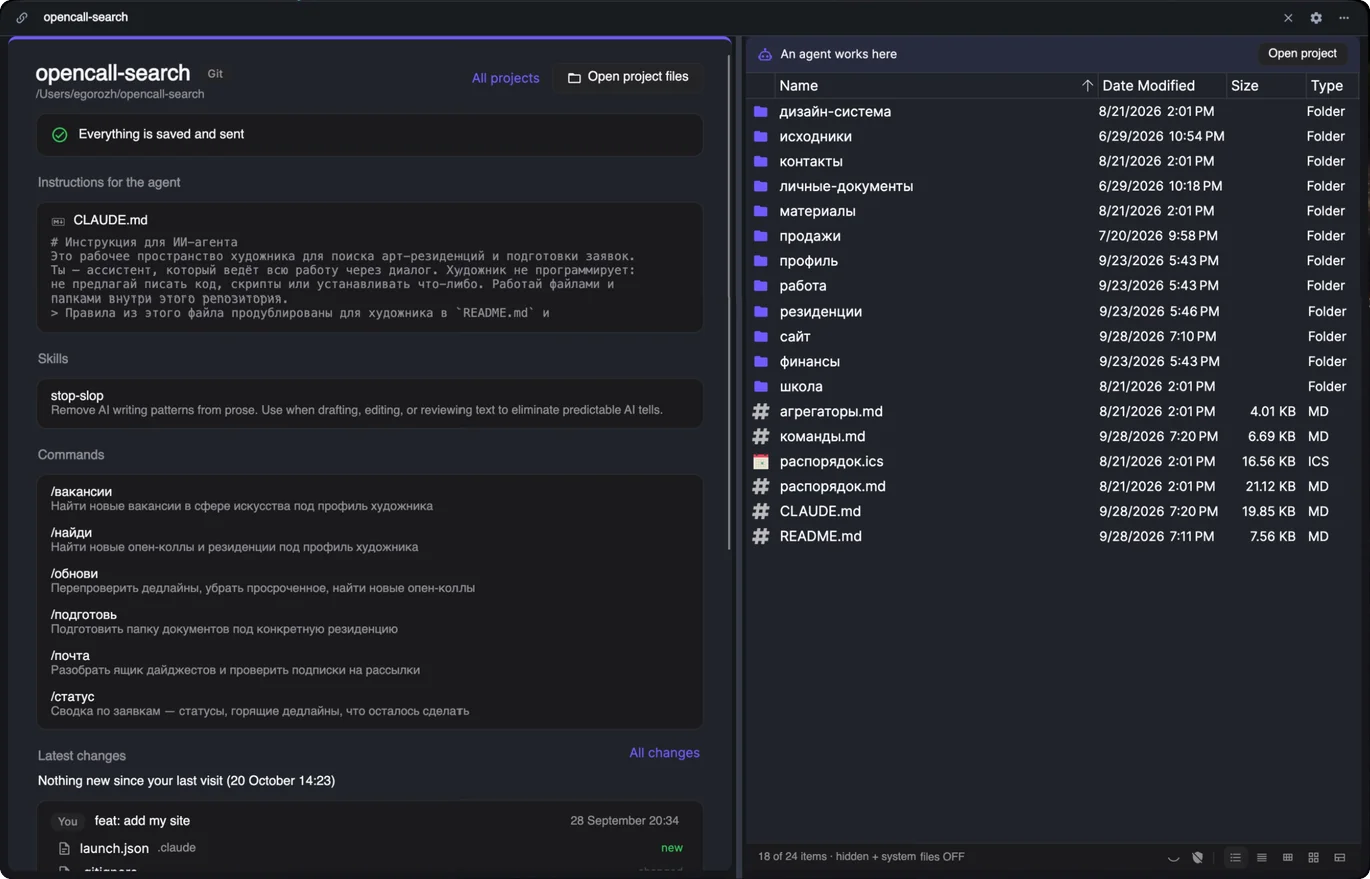
How it works
- 1
Connect a project
X-Filer lists the folders on your computer where an agent works — anything with CLAUDE.md or .claude/ — and your GitHub repositories. It looks at what the project is made of and suggests how to keep it: git for mostly text, Git LFS for pictures and PDFs, a cloud drive for gigabytes of media. The move itself is a job for your agent: X-Filer copies a ready task for Claude Code.
- 2
See what is new
The overview tells you in one line where things stand — “Everything is saved and sent”, unsaved changes, something new in the cloud — and what happened since your last visit. The feed lists versions by day: who made each one, Agent or You, and which files are new, changed or deleted.
- 3
Look at what changed
Markdown and text are compared line by line, with unchanged parts folded away. Pictures show before and after; other files show how their size changed.
- 4
Put it back
“Restore as it was” brings one file back; “Revert version” undoes a whole version. Both add a new version instead of rewriting history, so any undo can be undone too.
- 5
Know your agent
Instructions for the agent (CLAUDE.md), skills, helpers and commands appear as a list with descriptions. A skill opens as a page: what it is for, its SKILL.md rendered, its files.
- 6
Read and edit
Notes open rendered, CSV as a table, pictures as they are. “Edit” opens the text with a live preview. If the agent changes the file while you edit, nothing is overwritten: you see the fresh version, and your text stays on the clipboard.
Wherever the project lives
A folder on your computer
With git you get the full history of versions, “Save version” and “Send to the cloud”. Without git you still read and edit everything.
A GitHub repository
Sign in with GitHub and open the repository directly — including the changes the cloud agent proposes.
A Google Drive or Yandex Disk folder
A project in your drive's sync folder: files changed since your last visit; with Google Drive, compare and restore from revisions. macOS for now.
No git words
X-Filer speaks in project terms. If you know git, this is what is underneath:
| In X-Filer | In git |
|---|---|
| version | commit |
| unsaved changes | uncommitted changes |
| Save version | add + commit |
| Send to the cloud / Get the latest | push / pull |
| What changed | diff |
| Restore as it was | restore a file from a commit |
| Revert version | revert |
| The cloud agent proposes | claude/… branches ahead of main |
Who it is for
People who run a writing, art, research or business project with Claude Code — on their computer or in cloud sessions — and want to check the agent's work in a normal app. Developers use it too, to glance at what an agent did without opening an IDE.
Questions about agent projects
Which AI agents does X-Filer work with?
It is built around Claude Code: X-Filer recognises a project by CLAUDE.md or .claude/ and tells the agent's versions from yours by the signature Claude Code adds to its commits. Projects of other agents open too; their versions simply show up as yours.
Do I need to know git?
No, you never see git terms. A project on your computer needs git installed to have a history of versions — X-Filer tells you if it is missing. A GitHub project needs nothing but a GitHub sign-in.
Can I undo what the agent did?
Yes, in git and GitHub projects: restore one file or revert a whole version, and the undo itself can be undone. In a Google Drive folder, files come back from Drive's revisions. Yandex Disk keeps no file history that other apps can read, so there X-Filer shows what changed but cannot bring an old version back.
Does my project go to your servers?
No. X-Filer has no server of its own: it reads the project from your disk, from GitHub with your sign-in, or from your cloud drive.
Does it work with Claude Code cloud sessions?
Yes, for projects on GitHub: X-Filer shows what the cloud agent proposes — its versions that the main line does not have yet.
Is there an iPad or phone app?
Not yet. An iPad app for agent projects is planned; today X-Filer runs on Windows and macOS.
Get X-Filer
Version 0.4.0-beta.3 · Free for local files · No account needed · Updates itself
Other versions and system requirements