· 10 min read
WinSCP for Mac? What to Use Instead in 2026
There is no WinSCP for Mac. Cyberduck, FileZilla, Transmit, ForkLift, Commander One and X-Filer compared on price, panes, SSH keys and clouds.
ReadServers and buckets open as drives next to your local disks and clouds. One app for Windows, macOS and Linux, with the server's key checked on every connection.
Version 1.0.0-Beta.3 · Free, with no account, for local files · Updates itself
Other versions and system requirements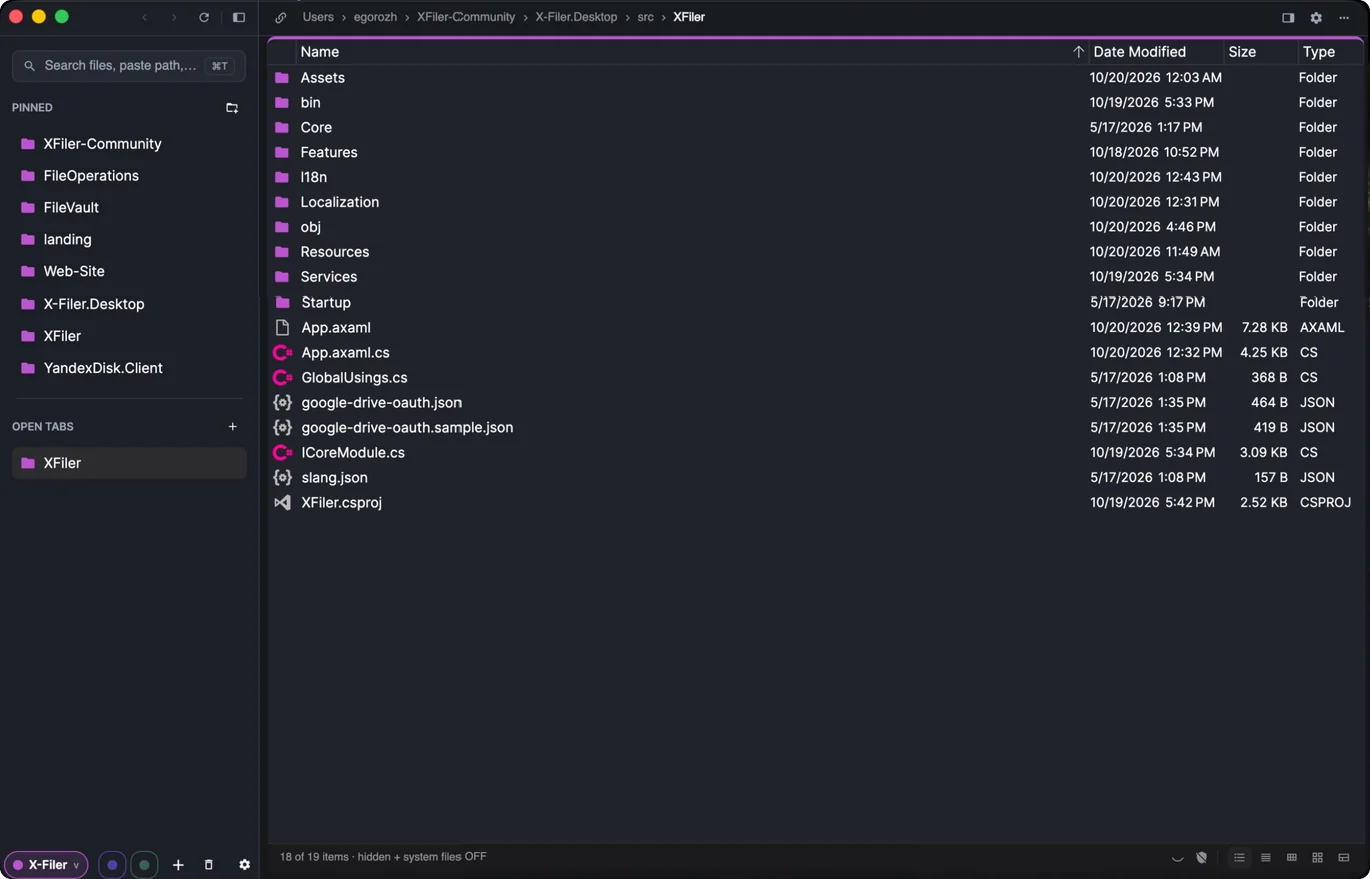
X-Filer, our file manager for Windows, macOS and Linux, is also an SFTP, FTP, WebDAV and S3 client. A server or a bucket connects as a drive in the sidebar, opens like a folder, and sits next to your local disks and cloud drives such as Google Drive, OneDrive, Dropbox and Yandex Disk, so you can drag files from a server to a cloud in split view. The same app runs on Windows 10/11, macOS 14+ and Linux, which neither WinSCP (Windows only) nor Transmit (macOS only) does.
Open Add Drive, pick the kind and fill in the form; the drive appears in the sidebar.
| Kind | What you enter | Good to know |
|---|---|---|
| SFTP | Server, port (22 by default), user name, a password or an SSH key file with its passphrase, folder to open | The server's key is remembered on the first connection |
| FTP and FTPS | Server, port, user name and password; leave the user name empty for anonymous access | Turn on Use TLS (FTPS) when the server supports it |
| WebDAV | The server's WebDAV address, user name and password | Nextcloud, Synology, ownCloud; use an app password where the server offers one |
| S3-compatible | Endpoint (empty for Amazon S3), region, bucket, access key ID and secret | Cloudflare R2, Backblaze B2, MinIO, Yandex Object Storage; one bucket becomes one drive; path-style addresses for MinIO |
| SMB | An address such as smb://server/share |
Connected through your system, which asks for the password |
There is more in the same sidebar: iCloud Drive on a Mac and the files of your WSL distributions on Windows. Every field is explained in the servers and network folders guide.
Most server work is moving files between two places. Open split view, put the server in one pane and a local folder, Google Drive, Yandex Disk or an S3 bucket in the other, and drag files across; between different drives a drag copies. Copies between a server and a cloud go through your computer: X-Filer downloads from one side and uploads to the other.
Name clashes get Replace, Save Both, Skip or Cancel, and long copies show progress with a Cancel button. Files also go out to Finder or Explorer by drag and drop or the clipboard.
Deleting on a server is permanent, so X-Filer asks first, and Undo does not cover operations on servers.
Each of these apps is good at something. The biggest difference is where they run:
| App | Windows | macOS | Where it wins |
|---|---|---|---|
| WinSCP | Yes | No | Scripting, folder sync, PuTTY integration |
| Transmit 5 | No | Yes (macOS 13+) | Folder sync, saved sites synced between Macs |
| Cyberduck | Yes | Yes | Many cloud services, folder sync, Cryptomator vaults |
| X-Filer (ours) | Yes (x64, ARM64) | Yes (macOS 14+) | A full file manager with servers, Google Drive, OneDrive, Dropbox and Yandex Disk in one window, the same on both systems |
Platforms as listed on the vendors' sites when we checked in October 2026. If you are moving from WinSCP to a Mac, read WinSCP for Mac; if you are going the other way, Transmit for Windows covers the options on a PC.
So you know where a dedicated client is the better choice:
X-Filer is before version 1.0. The download and local files are free, with no ads and no account. Servers and cloud drives need an X-Filer account: the Free plan includes one connection, Pro has no limit, and a new account starts with 30 days of Pro — see pricing.
The download and managing local files are free. With a free X-Filer account, one server or cloud drive is free too; more than one needs Pro, after a 30-day Pro trial with no card — see the pricing page.
Yes. Choose an SSH key file instead of a password, and enter the key's passphrase if it has one. The passphrase is kept in the macOS Keychain or, on Windows, encrypted for your user account; on Linux, in a file only your user account can read.
No. X-Filer opens servers and buckets inside its own window. Use a mounting tool if you need a drive letter or a Finder volume.
Amazon S3 and services with an S3-compatible endpoint, such as Cloudflare R2, Backblaze B2, MinIO and Yandex Object Storage. One bucket becomes one drive, and you can open a folder inside the bucket as its root.
Yes. Open the server and Google Drive side by side in split view and drag the files across. The copy goes through your computer.
There is no WinSCP for Mac. Cyberduck, FileZilla, Transmit, ForkLift, Commander One and X-Filer compared on price, panes, SSH keys and clouds.
ReadFileZilla alternatives for Mac and Windows: WinSCP, Cyberduck, Transmit, ForkLift, Commander One and X-Filer, for when you need a file manager too.
ReadUse Nextcloud without the sync client: the WebDAV address, app passwords, what goes wrong in Finder and Windows Map network drive, and a file manager option.
ReadVersion 1.0.0-Beta.3 · Free, with no account, for local files · Updates itself
Other versions and system requirements