· 12 min read
How to Access Google Drive Without Syncing (Mac & Windows)
Access Google Drive without syncing on Mac and Windows: streaming, the browser, mount tools and a file manager with Drive built in, compared honestly.
ReadGoogle Drive, OneDrive, Dropbox, Yandex Disk, S3, WebDAV and SFTP open as folders next to your local disks. No sync client, nothing copied to your disk until you ask.
Version 1.0.0-Beta.3 · Free, with no account, for local files · Updates itself
Other versions and system requirements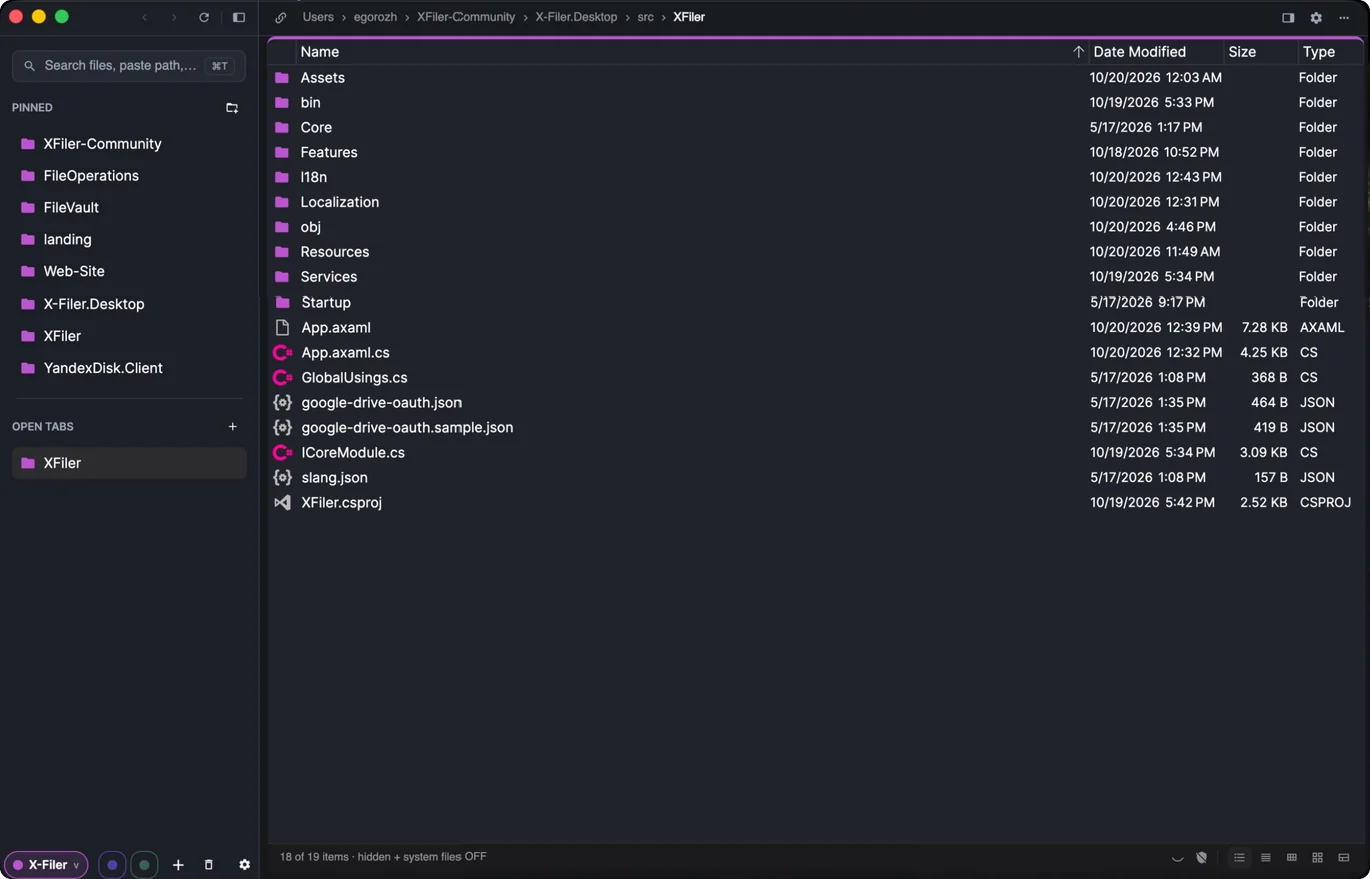
X-Filer, our file manager for Windows, macOS and Linux, opens Google Drive, OneDrive, Dropbox, Yandex Disk, S3 buckets, WebDAV and SFTP servers as folders in its own window. You sign in once through your browser, then browse, copy, rename, delete and preview files without Google Drive for desktop or any other sync client, and without a copy of your cloud on your disk. Be clear on the trade-off: X-Filer does not mount a drive letter or a Finder volume, and cloud files are not available offline.
A cloud drive in X-Filer is just another drive in the sidebar. Files are read from the cloud when you open them, and nothing lands on your disk until you copy it there. No background client, no cache folder.
| Drive | How you connect |
|---|---|
| Google Drive (My Drive) | Sign in through your browser |
| OneDrive | Sign in with Microsoft in your browser; personal, work and school accounts |
| Dropbox | Sign in through your browser, paste the code Dropbox shows |
| Yandex Disk | Sign in through your browser, paste the code Yandex shows; several accounts are fine |
| S3-compatible storage | Endpoint, bucket and access keys: Amazon S3, Cloudflare R2, Backblaze B2, MinIO, Yandex Object Storage. One bucket becomes one drive |
| WebDAV | Nextcloud, Synology, ownCloud, with an app password where the server offers one |
| SFTP and FTP | Password or SSH key; X-Filer remembers the server's key |
| Network folders (SMB) | Through your system |
| iCloud Drive | On a Mac, with Download Now and Remove Download |
| WSL | On Windows, the files of your Linux distributions |
Step-by-step setup for each drive is in the cloud drives guide, and servers have their own guide.
Google's client either mirrors My Drive to your disk or streams it through a local cache, and it keeps running in the background. If you mostly move files between Drive and your computer, X-Filer skips that: sign in, and My Drive opens as a folder.
One limit to know up front: Shared drives are not supported yet, only My Drive. The full comparison of streaming, the browser, mounting tools and a file manager is in How to access Google Drive without syncing.
OneDrive, with personal, work and school Microsoft accounts, and Dropbox open the same way, without the OneDrive or Dropbox app: sign in through your browser, and the drive appears in the sidebar. Search goes through subfolders on the drive itself, and Copy Public Link works for one selected file or folder, as on Google Drive and Yandex Disk.
Open split view and put Google Drive in one pane and Yandex Disk, an S3 bucket or your Downloads folder in the other. Drag files across to copy them. Copies between two clouds go through your computer: X-Filer downloads from one and uploads to the other, so large transfers take as long as your connection needs.
Spaces keep this tidy: a work Space pins the client's Drive folder, a personal one your photos. If Yandex Disk is your main cloud, read Yandex Disk on Mac and Windows: the official desktop app now needs a Yandex 360 subscription, and X-Filer works without one through the API (checked by us on free accounts in October 2026, not guaranteed by Yandex).
Select a file and press Space for a quick preview: pictures, text, PDFs, Markdown and code with syntax highlighting; the arrow keys walk the folder. Need a file in another app? Drag it to Finder or Explorer, or copy and paste it there.
So you can rule it out quickly:
If you need a cloud as a drive letter or volume, a mounting tool fits better: CloudMounter (Mac and Windows), RaiDrive (Windows) or rclone, compared with prices checked in October 2026 in the Google Drive guide. Replacing Finder anyway? See Finder alternatives with cloud drives.
The download and managing local files are free, with no ads and no account. Cloud drives and servers need an X-Filer account: the Free plan includes one of them, Pro has no limit and copies between clouds, and a new account starts with 30 days of Pro, no card. Plans and prices are on the pricing page. Sign-ins are stored in the macOS Keychain or, on Windows, encrypted for your user account; on Linux, unencrypted in a file only your user account can read. Files and cloud sign-ins never pass through us: X-Filer talks to your clouds directly, and our server keeps only your account — email, devices and plan (Privacy Policy).
No. X-Filer signs in to Google Drive through your browser and talks to the cloud directly, so no Google client is installed and nothing is synced to your disk until you copy it.
No. Cloud drives open inside X-Filer's own window, and files go to Explorer or Finder by drag and drop or the clipboard. Cloud files are not available offline either.
Google Drive, OneDrive, Dropbox and Yandex Disk, plus SFTP, FTP, WebDAV (Nextcloud, Synology, ownCloud), S3-compatible storage, SMB network folders, iCloud Drive on a Mac and WSL on Windows.
Yes. Open the two drives side by side in split view and drag files from one pane to the other. The copy goes through your computer, downloading from one cloud and uploading to the other. Two clouds at once need Pro or the trial: the Free plan includes one connection.
One is. With a free X-Filer account, the Free plan includes one cloud drive or server; Pro has no limit, and a new account starts with 30 days of Pro, no card — see the pricing page. Local files stay free, forever, with no account.
Google requires an independent security assessment for apps with full access to Google Drive. X-Filer has passed Google's other checks and is working on this last one. Until it is done, Google shows a “Google hasn't verified this app” screen when you connect Google Drive: click Advanced, then the link to X-Filer marked unsafe. Your sign-in still goes straight from your computer to Google. Until the assessment is complete, Google also limits how many people can connect Google Drive, so places are limited; other clouds and servers are not affected.
Connect Yandex Disk, Google Drive, OneDrive and Dropbox to X-Filer and browse them like folders — no sync client, previews, search and public links.
Show two folders side by side in X-Filer, copy and move files between them, and close the second pane.
Look inside pictures, PDFs, Markdown, code and text files in X-Filer with the Space bar, without opening another app.
Access Google Drive without syncing on Mac and Windows: streaming, the browser, mount tools and a file manager with Drive built in, compared honestly.
ReadYandex Disk's desktop app now needs a Yandex 360 plan. What still works on Mac and Windows: the web, WebDAV, rclone and file managers with Yandex Disk.
ReadFinder alternatives compared on what Finder lacks: dual panes, workspaces and Google Drive access without a sync client. Prices checked October 2026.
ReadVersion 1.0.0-Beta.3 · Free, with no account, for local files · Updates itself
Other versions and system requirements