· 7 min read
Google Drive on Linux: 5 Ways Without an Official App
Google has no Drive client for Linux. GNOME Online Accounts, KIO GDrive, rclone, Insync, overGrive and X-Filer compared, prices checked November 2026.
ReadTwo panes, Spaces and tabs, with Google Drive, SFTP and S3 opening like ordinary folders. One AppImage, the same app as on Windows and Mac.
Version 1.0.0-Beta.3 · Free, with no account, for local files · Updates itself
Other versions and system requirements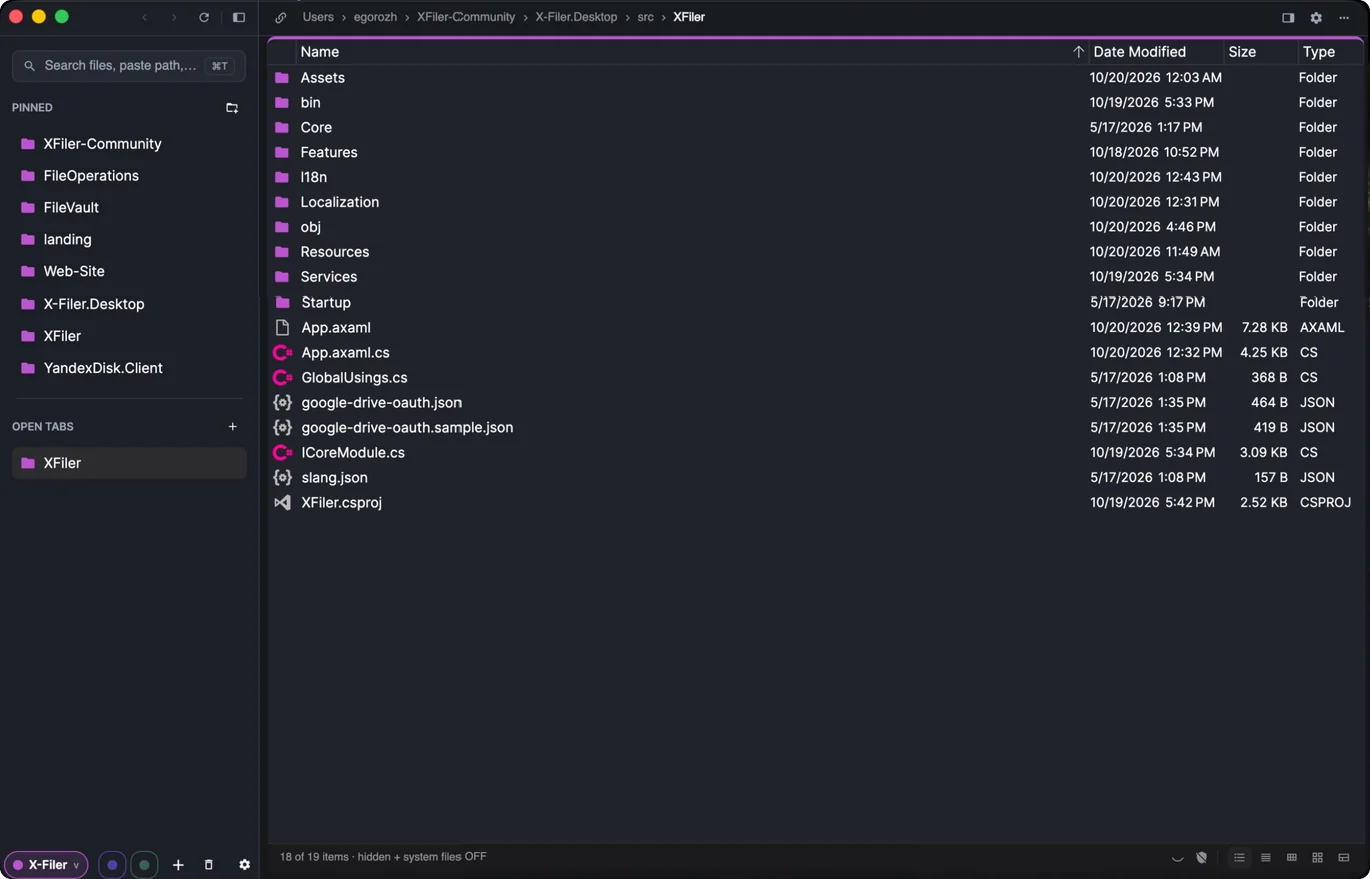
X-Filer is a free file manager for Linux, and it is our product. It puts two folders side by side in one window, keeps separate Spaces for work and personal files, and opens Google Drive, OneDrive, Dropbox, Yandex Disk, SFTP, FTP, WebDAV and S3 like ordinary folders, without a sync client or a FUSE mount. It ships as a single x64 AppImage for Ubuntu 22.04, Debian 12, Fedora 36 and later, runs on X11 or Wayland, and is the same app with the same layout as on Windows and macOS.
The file manager your desktop came with is good at local folders. These are the gaps people usually fill with a second app, a sync client and an FTP client:
| You want | Usually on Linux | In X-Filer |
|---|---|---|
| Google Drive | No official Google client; GNOME Online Accounts, rclone or a paid client such as Insync | Built in, sign in through the browser |
| Yandex Disk | Yandex's console client, no graphical app | Built in, through the Yandex Disk API |
| SFTP, FTP, WebDAV | Connect to Server in GNOME Files, KIO in Dolphin, or FileZilla | Built in, in the sidebar next to your disks |
| S3, R2, MinIO | Command line (aws, rclone, duck) |
Built in, buckets open as folders |
| Two folders side by side | Dolphin's split view; F3 in GNOME Files is gone | Split view in one window, drag across |
| Separate contexts | One set of bookmarks | Spaces, each with its own pinned folders, tabs and colour |
| The same tool on every computer | Each desktop has its own file manager | The same app on Windows 10/11 and macOS 14+ |
Google has never released Google Drive for Linux, and Yandex offers only a console client. X-Filer talks to both through their APIs, and to OneDrive and Dropbox too: add the drive, sign in in your browser, and browse it in a tab. Nothing is downloaded until you open or copy a file, so a 2 TB drive does not need 2 TB on your SSD. Preview pictures and PDFs, rename, move, share a link, and drag files between the cloud and your disk. The whole story, with Insync, rclone and GNOME Online Accounts compared, is in Google Drive on Linux without a sync client. Setup steps are in the cloud drives guide.
SFTP with a password or a key, FTP and FTPS, WebDAV for Nextcloud and other servers, and S3-compatible storage with your own endpoint all live in Add Drive. Open a server in one pane and Google Drive in the other and drag files across: X-Filer copies them through your computer. If you used WinSCP on Windows, WinSCP for Linux compares the options. Details are in the servers guide.
Click the split button or choose Open beside on a pinned folder or tab, and a second pane opens next to the first; in the Launcher, Alt+Enter does the same. Drag files across: within one disk they move, between disks, clouds and servers they copy. Open tabs live in the sidebar, Spaces keep separate sets of pinned folders and tabs, and the Launcher on Ctrl+T jumps to any folder, drive or typed path. On Linux X-Filer uses the same shortcuts as on Windows: F2 renames, Delete moves to the Trash, Ctrl+Z undoes. If you came from Total Commander, see Total Commander for Linux for an honest comparison with Double Commander and Krusader.
gio trash use, and the Trash page restores them.user-dirs.dirs, localized names included; USB drives under /media and /run/media show up in the sidebar.XFiler-linux-x64.AppImage, make it executable with chmod +x XFiler-linux-x64.AppImage or Properties → Allow executing, and run it. Nothing is installed system-wide, and X-Filer updates the AppImage in place.~/.config/XFiler. The step-by-step guide is Getting started.The Linux version is the newest of the three: it was first released in November 2026, and X-Filer as a whole is before version 1.0. Some things are not there yet on Linux:
secrets.json in the settings folder, readable only by your user account but not encrypted: X-Filer does not use GNOME Keyring or KWallet yet. On Windows and macOS they are encrypted.Found a problem on your distribution? Tell us in the issue tracker.
Yes, for local files: no ads, no account, free forever. Cloud drives and servers need an X-Filer account: the Free plan includes one, Pro has no limit, and a new account starts with 30 days of Pro, no card — see the pricing page.
Any x64 distribution with glibc 2.35 or newer, such as Ubuntu 22.04, Debian 12, Fedora 36 and later. It runs on X11 and on Wayland.
Yes. Google Drive is built in: you sign in through your browser and browse the drive in a tab, without a sync client. Files are not kept offline.
Not yet. X-Filer ships as an AppImage, which runs on most distributions without installing anything and updates itself.
It works alongside them. They share the same Trash and the same folders, so you can do your daily work in X-Filer and keep your desktop's file manager for the rest.
Download X-Filer for Windows, macOS or Linux, open it for the first time and get to your files in a minute.
Connect Yandex Disk, Google Drive, OneDrive and Dropbox to X-Filer and browse them like folders — no sync client, previews, search and public links.
Connect SFTP, FTP, WebDAV (Nextcloud, Synology), S3-compatible storage, SMB network folders, iCloud Drive and WSL in X-Filer.
Google has no Drive client for Linux. GNOME Online Accounts, KIO GDrive, rclone, Insync, overGrive and X-Filer compared, prices checked November 2026.
ReadThere is no Total Commander for Linux. Double Commander, Krusader, Midnight Commander, Wine and X-Filer compared for people moving from Windows.
ReadWinSCP and the Cyberduck app have no Linux versions. FileZilla, GNOME Files, Dolphin, Krusader and X-Filer as GUI SFTP clients on Linux, compared.
ReadVersion 1.0.0-Beta.3 · Free, with no account, for local files · Updates itself
Other versions and system requirements