· 11 min read
Finder Alternatives With Cloud Drives Built In (2026)
Finder alternatives compared on what Finder lacks: dual panes, workspaces and Google Drive access without a sync client. Prices checked October 2026.
ReadTwo panes in one window, Spaces, and your clouds and servers in the sidebar. Finder's shortcuts, native on Apple Silicon and Intel.
Version 1.0.0-Beta.3 · Free, with no account, for local files · Updates itself
Other versions and system requirements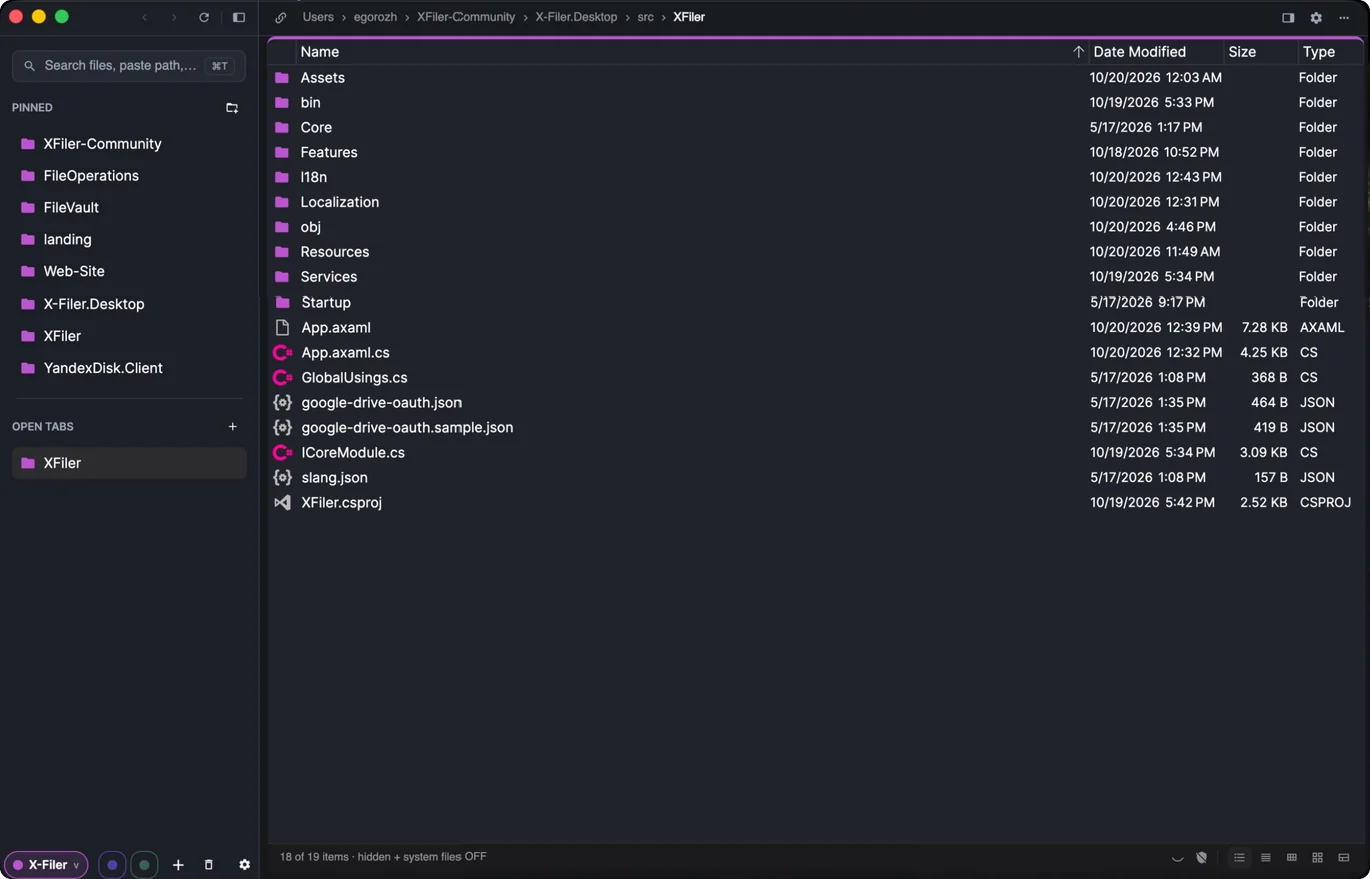
X-Filer is a free file manager for Mac, and it is our product. It adds what Finder does not have: two folders side by side in one window, Spaces with their own pinned folders and tabs, and Google Drive, OneDrive, Dropbox, Yandex Disk, SFTP and S3 in the sidebar without sync clients. It runs natively on Apple Silicon and Intel Macs with macOS 14 Sonoma or later, keeps Finder's keyboard shortcuts and works alongside Finder rather than fighting it.
Finder is good at what it does. These are the gaps people usually look for a Finder alternative to fill:
| You want | In Finder | In X-Filer |
|---|---|---|
| Two folders side by side | Two windows arranged by hand | Split view in one window, ⌘\ |
| Separate contexts for work, personal, projects | One set of sidebar favourites | Spaces, each with its own pinned folders, open tabs and accent colour |
| Google Drive | Google's Drive for desktop client | Built in, sign in through the browser |
| OneDrive and Dropbox | Each provider's desktop app | Built in, sign in through the browser |
| Yandex Disk | The Yandex Disk app, which needs Yandex 360 since June 2026 | Built in, works without Yandex 360 (checked by us in October 2026) |
| SFTP and S3 | Not in Connect to Server | Built in, next to your disks |
| Tabs that don't pile up | Tabs stay until you close them | Open tabs expire after inactivity, on close or never; pinned folders stay |
| One app on a Mac and a PC | Mac only | The same app on Windows 10/11 |
Press ⌘\ or choose Open beside on a pinned folder, and a second pane opens next to the first; the accent line marks the active one. Drag files across: within one disk they move, between disks, clouds and servers they copy, and ⌥ forces a copy. Press ⌘\ again to close the pane. Details are in the split view guide.
X-Filer uses Finder's keys on a Mac: ⌘↓ opens, ↩ renames, ⌘⌫ moves to the Trash, ⌘I shows Get Info, ⌥⌘V moves what you copied, ⌘Z undoes a move, rename or trip to the Trash. Space opens a quick preview of pictures, PDFs, Markdown and code, with Open in Quick Look for anything else. The full list is on the keyboard shortcuts page.
It also plays well with Finder itself. Drag and drop and copy and paste work in both directions, Finder's colour tags show as dots and are the same tags Finder sees, and Show in Finder is one click away. iCloud Drive is in the sidebar, with Download Now and Remove Download for each file.
A Space is a separate workspace with its own pinned folders, open tabs and colour: one for client work, one for photos, one for a side project. Switch with the dots at the bottom of the sidebar or ⌃1 to ⌃9. See the Spaces guide.
If you run a project with Claude Code, X-Filer also shows what the agent changed since your last visit, in plain words. That part has its own page.
X-Filer is young: it is before version 1.0, and ForkLift or Path Finder have longer feature lists. It does not compare or sync folders, it does not mount clouds as volumes in Finder, and cloud files are not available offline. We compare six Mac options, prices included, in Finder alternatives with cloud drives. If you also use a PC, see why ForkLift has no Windows version, and if you came from WinSCP, read WinSCP for Mac.
It works alongside Finder rather than replacing it. You can do your daily file work in X-Filer, and drag and drop, the clipboard, tags and Show in Finder keep the two in step.
Yes. There are native builds for Apple Silicon and for Intel Macs, both for macOS 14 Sonoma or later.
Yes, for local files: no ads, no account, free forever. Cloud drives and servers need an X-Filer account: the Free plan includes one, Pro has no limit, and a new account starts with 30 days of Pro, no card — see the pricing page.
Yes. Split view shows two folders side by side in one window, and you can drag files between a local disk, a cloud drive and a server.
Yes. X-Filer runs on Windows 10 and 11 with the same layout, using Explorer's shortcuts there and Finder's on a Mac. There is a Linux version too.
Show two folders side by side in X-Filer, copy and move files between them, and close the second pane.
Separate workspaces in X-Filer, each with its own pinned folders, open tabs and colour — create, switch, rename and delete them.
Every keyboard shortcut of X-Filer on macOS, Windows and Linux — navigation, files, views, tabs and Spaces.
Finder alternatives compared on what Finder lacks: dual panes, workspaces and Google Drive access without a sync client. Prices checked October 2026.
ReadThere is no ForkLift for Windows. Here are the file managers that run on both Mac and PC, compared on price, dual pane and built-in cloud drives.
ReadThere is no WinSCP for Mac. Cyberduck, FileZilla, Transmit, ForkLift, Commander One and X-Filer compared on price, panes, SSH keys and clouds.
ReadVersion 1.0.0-Beta.3 · Free, with no account, for local files · Updates itself
Other versions and system requirements