Servers and network folders
Connect SFTP, FTP, WebDAV (Nextcloud, Synology), S3-compatible storage, SMB network folders, iCloud Drive and WSL in X-Filer.
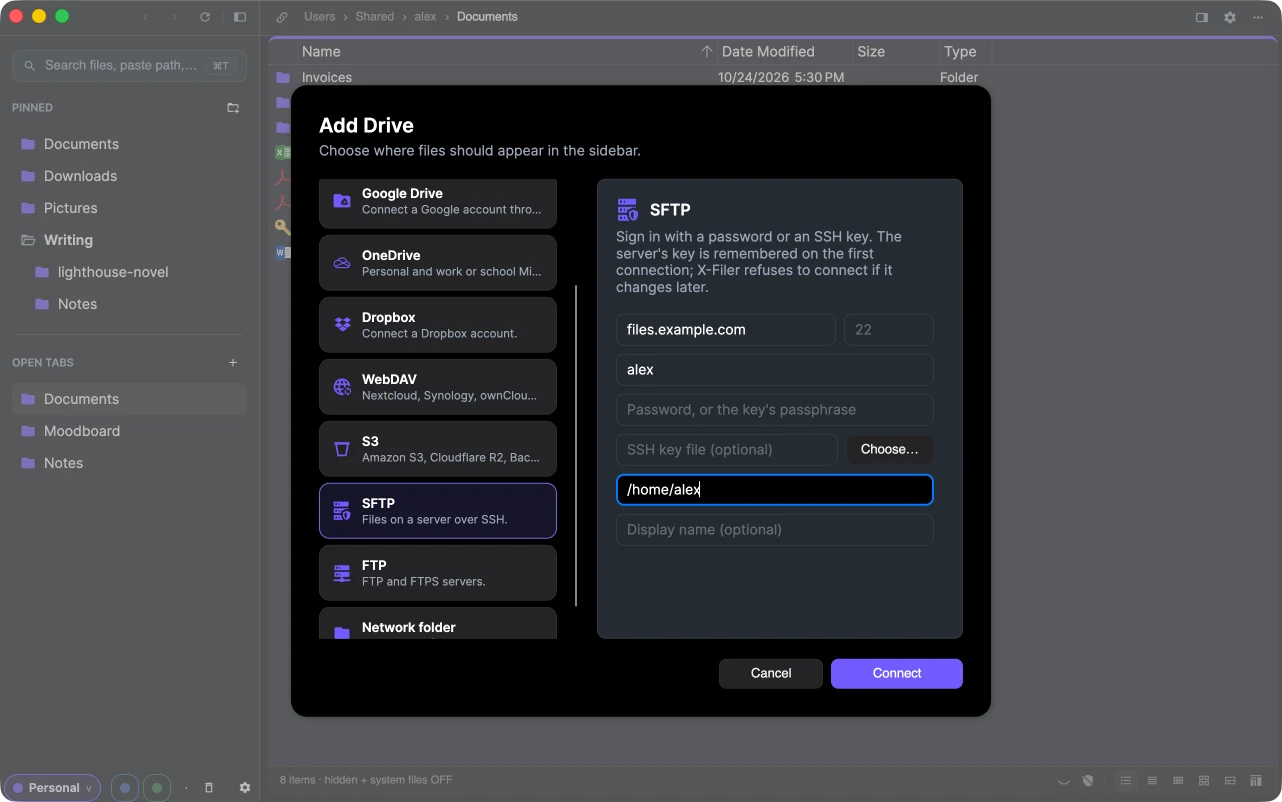
Servers, NAS boxes and object storage connect the same way as cloud drives: open Add Drive (the launcher's Connect, Settings → Drives → Connect drive or the start page of an empty Space), choose the kind on the left and fill in the form. The drive then appears in the sidebar and works like any folder.
Passwords and keys are stored in the macOS Keychain or, on Windows, encrypted for your user account.
SFTP
Files on a server over SSH.
- Server and port (22 by default), user name;
- a password, or an SSH key file (Choose…) with the key's passphrase if it has one;
- Folder to open — for example
/home/alexor/var/www; Display name — how the drive is called in the sidebar.
On the first connection X-Filer remembers the server's key. If the key changes later, X-Filer refuses to connect — that is how a man-in-the-middle shows itself.
FTP and FTPS
Server, port, user name and password. Leave the user name empty for anonymous access. Turn on Use TLS (FTPS) when the server supports it: plain FTP sends the password unencrypted.
WebDAV — Nextcloud, Synology, ownCloud
Enter the server's WebDAV address, your user name and password. For Nextcloud the address looks like https://cloud.example.com/remote.php/dav/files/alex/. Where the server offers app passwords, use one instead of your main password.
S3-compatible storage
Amazon S3, Cloudflare R2, Backblaze B2, MinIO, Yandex Object Storage and other S3-compatible services. One bucket becomes one drive.
- Endpoint — leave it empty for Amazon S3; other services show theirs in their console;
- Region, Bucket, Access key ID and Secret access key;
- Folder inside the bucket — optional, to open a prefix as the drive's root;
- Path-style addresses — for MinIO and some other services.
Network folders (SMB)
Shares on a NAS or another computer. Enter the address, for example smb://server/share. The system asks for the name and password and remembers them; X-Filer then opens the share like a local folder.
iCloud Drive on macOS
When iCloud Drive is turned on, X-Filer shows it among the drives. Files that are only in the cloud can be fetched with Download Now in the context menu, and Remove Download frees the space while keeping the file in iCloud.
WSL on Windows
Linux distributions installed in WSL appear in Add Drive → WSL. Pick a distribution and browse its files from Windows; WSL starts it when you open the drive.