The launcher
Open folders, drives, pinned items and recent places in X-Filer from one search box, or paste a path.
Updated Читать по-русски
The launcher is the way to open anything in X-Filer without hunting for it: a drive, a pinned folder, a project, a recent place or a path you paste.
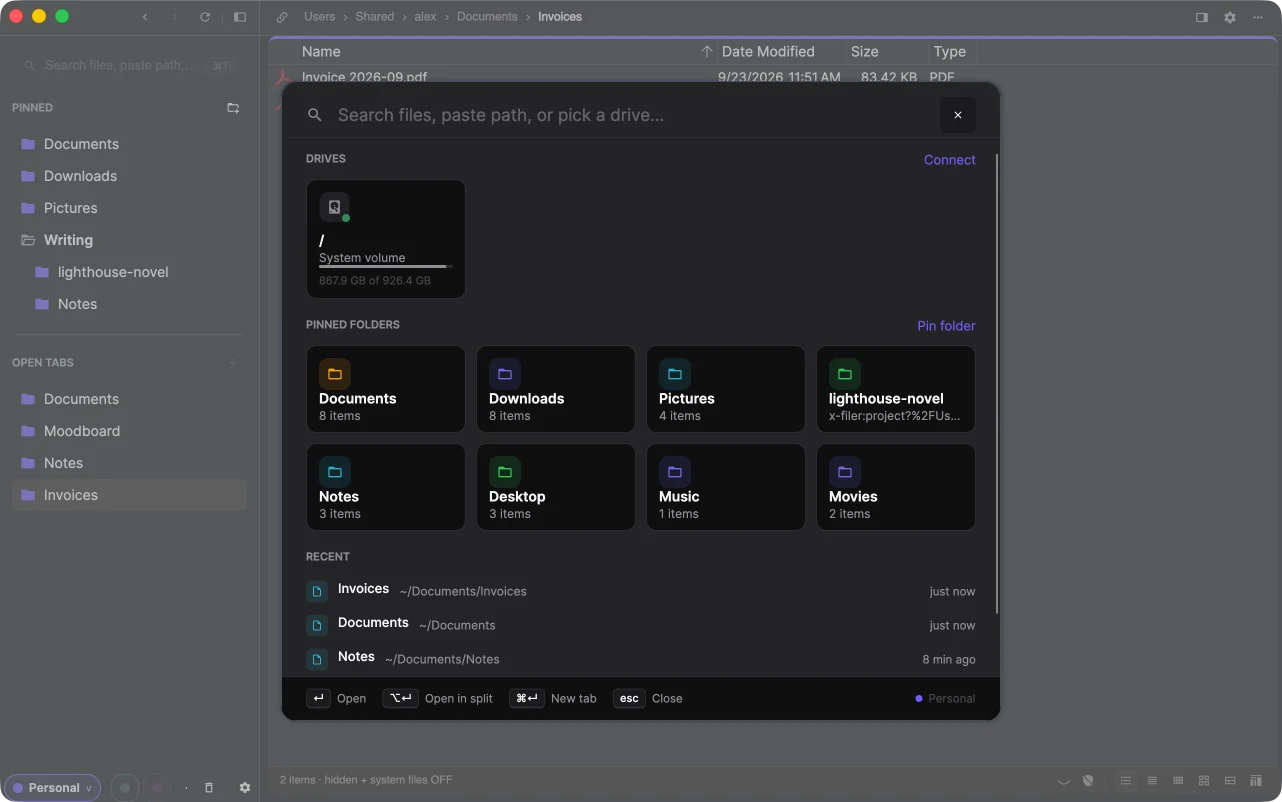
Open it with the search field at the top of the sidebar, the + next to Open tabs, or ⌘T / Ctrl+T.
What it shows
Before you type:
- Drives — the disks of this computer and the connected cloud drives and servers, with free space. Connect adds a new one.
- Pinned folders — your pins and the standard folders: Desktop, Downloads, Documents, Pictures, Music, Movies. Pin folder adds one.
- Recent — places you opened lately, newest first.
Type to filter them all at once: the results show pinned items, open tabs, drives, projects and recent places whose names match.
Open a path
Paste or type a path — ~/Documents/Invoices, /Volumes/Backup or D:\Photos — and the first result is Open path as typed.
Keys
| Key | Action |
|---|---|
| ↑ ↓ | move through the results |
| ↵ / Enter | open in the current tab |
| ⌥↵ / Alt+Enter | open in the other pane of split view |
| ⌘↵ / Ctrl+Enter | open in a new tab |
| esc | close the launcher |
The launcher looks for places, not for files inside folders. To find a file, open the folder and use search.